Accounting Components
Assets-Real : Generic Asset Account
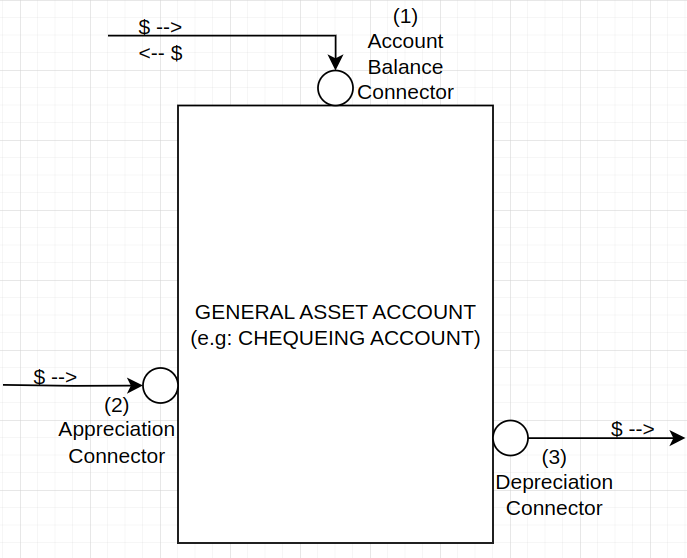
This block (or instrument) is used to hold onto cash value. An example would be a Chequing or savings account. A picture of what it looks like would be is on the right.
The idea is that money can flow into and out-of this block, and depending on the config settings of this Generic Asset account, the money can appreciate in value or depreciate in value. When money appreciates you need to tie the (2) “Appreciate Connector” to an EARN-type account. If the money in the account might loose value, you need to tie the (3) “Depreciate Connector” to a BURN-type account.
Configuration Settings (Properties)
Starting Value: If the account should start with a preexisting amount of money, it can be set in this field
Year-over-Year Growth Rate(%): If the account balance should gain or loose value value year-over-year, this can be used to accommodate for that. The growth is calculated at the start of every year based on the Account balance at that time. If this number is set, the Appreciate Connector or Depreciate Connector need to be connected to an earn or burn account respectively.
Assets-Unreal: Generic Asset Account
Exact same connectors and configuration settings as “Assets-Real: Generic Asset Account”. Some examples are house, car, etc.
Generic Earn Account
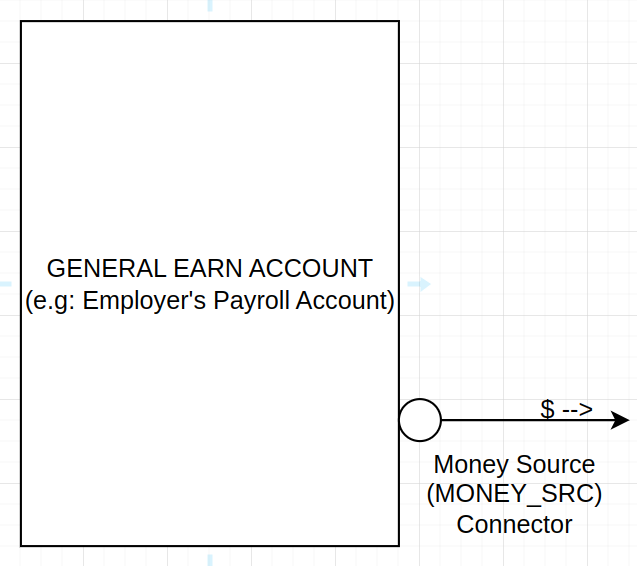
This account is used to provide a source of money that feeds value into your financial plan. An example would be an employer’s payroll account. It contains the money that you end up getting, so for the sake of our complete financial picture we need to know about it. A picture of what it would look like is on the right.
Notice, the $ symbol shown above, demonstrates the direction of how the money flows (like a faucet) out of the Earn-account.
Configuration Settings (Properties)
Earning Taxable: A true/false that indicates if the money coming from the money-source is taxed or not. This is to accommodate a future component that will handle tax calculations.
Generic Burn Account
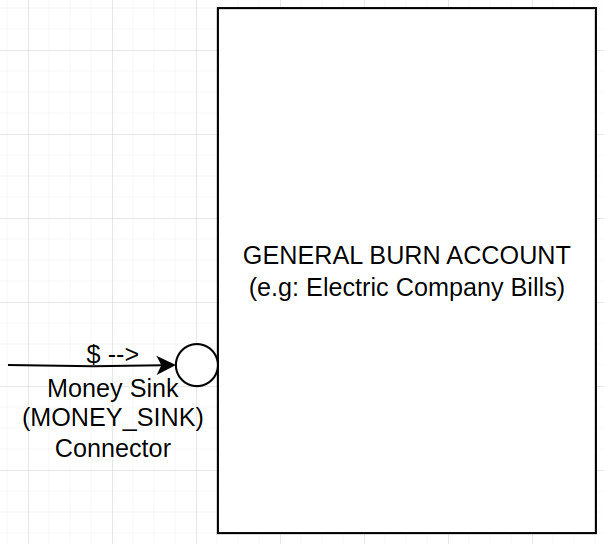
This account is used to provide a sink of money (as in, for example, the drain of the kitchen sink). When your money needs to leave your chequing account (due to say for example needing to pay the Electric bill), you connect your chequing account block to the this Burn account block on the “MONEY_SINK” connector. A picture of what the Burn Account would look like is on the left.
Notice, the $ symbol shown on the left, demonstrates the direction of how the money flows (like a sink drain) into the “General Burn Account”.
Configuration Settings (Properties)
BurnIsTaxDeductible A true/false that indicates if the money coming into the Burn account is tax-deductible. For example some types of stock-interests can actually be deducted from your personal taxes. We would indicate that here. Note, this is to accommodate a future component that will handle tax calculations.
Fixed Rate Compound Loan Account
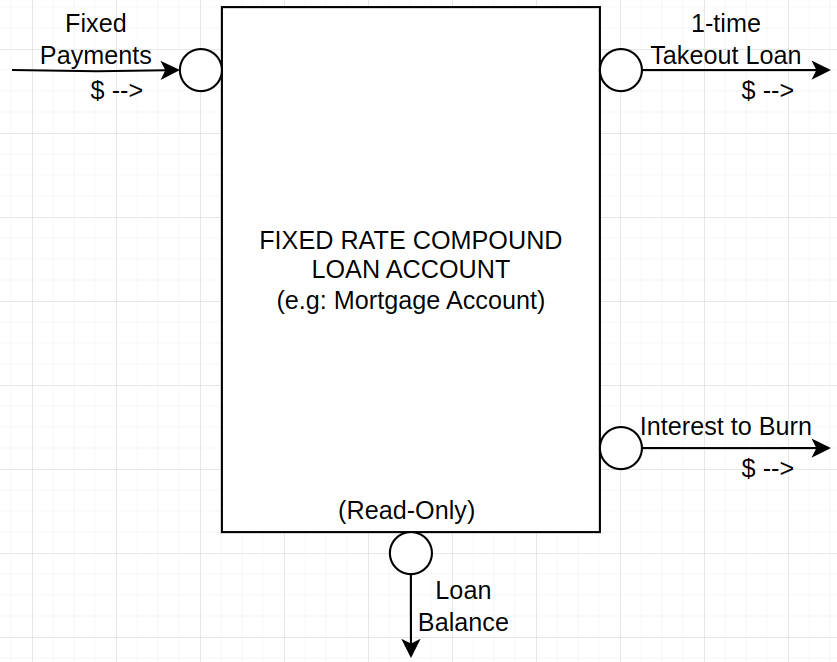
This Liability account is used to setup fixed rate compound loans (such as 5 year fixed rate mortgages). The idea is to use this type of account to track a mortgage (or other multi-year fixed-rate compound loan) to properly allocate how money flows to pay-down a balance, but also what money gets allocated to burn accounts (due to mortgage interest). Here is a picture of what a Fixed Rate Compound Loan picture looks like:
Now, lets look at what the different connectors do:
Fixed Payments: This connector would get connected to another account that would be the source of fixed-payments, an example would be a chequing account.
1-time Takeout Loan: This connector would get tied to whatever needs the loan money. A great example, is if the loan is a mortgage, you would tie this to an Unrealized asset account representing the Physical House (because the house is worth what price you purchased the house for, which is most of the mortgage cost).
Interest to Burn: This connector would get tied to a burn account because it represents the loan interest that you have to pay for having the loan to begin with. Everyday loan interest is calculated and noted inside the Fixed Rate Loan Block, then every month when a fixed payment is made, it is first applied to the interest owed, which internally routes that money to this Interest-To-Burn connector, so that it can Flow to a connected Burn account that you created (such as Loan Interest). The remaining portion of the payment is then applied to reduce the balance (or principal) of the owed loan.
Loan Balance: This connector is useful in configuring parts of the financial picture when you need to stop doing things. For example, you could use this connector in a configuration setting to stop paying fixed payments to the loan if there was no remaining balance.
In this way we can get an accurate picture of money spent on a loan and it getting paid off.
Next up, lets look at a simple example of a financial picture.